Name what's in the photo.
Real wildlife observations from iNaturalist. Pick a group and a place, and you'll be shown species seen there.
Building your quiz…
This photo is no longer available on iNaturalist; its photographer may have removed it.
Pinch, drag or double-tap to zoom
Which species is this?
Press A–D to answer, ←→ for more photos, +− to zoom
to save your scores and see your progress over time.
My scores
No quizzes yet. Start one.
Contact us
Thanks, your message is on its way. We read every message and will reply to the email address you gave if it needs an answer.
Back to the quizSign in
Sign in to save your scores and see your progress over time.
About Animal ID Quiz
A quiz that shows you real wildlife photos and asks you to name the species, using observations shared by the iNaturalist community.
About iNaturalist
iNaturalist is a nonprofit community science project and social network for people who record and share what they see in nature. Its goal is to connect people to nature and to advance biodiversity science and conservation.
Anyone can post a photo of a wild plant or animal with where and when they saw it. Other members then help identify it. When the community agrees on a species, the observation becomes research grade, and iNaturalist shares it with scientists through the Global Biodiversity Information Facility (GBIF), where it is used in research on where species live and how that is changing.
How Animal ID Quiz uses iNaturalist
- Observations. The quiz is built from iNaturalist's research-grade observations of wild animals, from a Darwin Core export of October 19, 2026. We keep observations identified to species, with a photo and a location accurate to within 10 km, and a sample of up to 25 per species in each 1-degree square of the map.
- Places. Place names and outlines (countries, states, counties, parks and more) come from iNaturalist, so a quiz for "California" only shows species seen there.
- Wrong answers. The other choices are species from the same family that have also been seen in that place, so the quiz tests what you could really mix up in the field.
- Photos. Photos are shown straight from iNaturalist's open data on Amazon Web Services; we don't copy them. Each one is credited to its photographer under the Creative Commons license they chose, and links back to the observation on iNaturalist.
- What the photos show. iNaturalist records evidence that an animal was there, so not every photo shows a living animal. Some show signs it left behind, such as nests, tracks and footprints, feathers, shed skins, burrows, droppings or bones.
- Living animals only. This option, on by default, skips photos that iNaturalist members have marked as a dead animal, or as showing only signs of it. Not every photo is marked, so a few may still get through. To turn it on or off, open Settings (the gear icon at the top right).
- Names. English bird names follow the Clements checklist of the birds of the world; other English names come from iNaturalist.
Please note: some photos show dead animals, such as roadkill, birds that hit windows, or prey. They are real records of where species live, and we can't screen them all out. To skip the ones we know about, keep Living animals only on in Settings.
Animal ID Quiz is an independent project and is not affiliated with or endorsed by iNaturalist. If you'd like to help, the best way is to post your own observations and help identify others' on iNaturalist.
For how many species and observations the quiz has, and a map of where, see Explore.
Explore
What the quiz holds, and where.
Species by place
How many species the quiz has in each place. Click an area to zoom in, down to counties and districts.
Loading the map…
Places
What's in the quiz
Loading the numbers…
By animal group
Research-grade observations by group
Places you can choose
Observation counts are all usable research-grade observations in the export; the quiz draws its questions from the photo sample.
Species counts are the species with usable research-grade iNaturalist observations in each place. Outlines come from iNaturalist and are simplified for the map; parks and protected areas aren't shown.
Settings
Saved in this browser.
All quizzes › United States
California bird quiz
Can you name the birds of California? Each question shows a real photo observed in California, with choices drawn from close relatives that live there too.
700 species · 220,710 photographed observations
Start the California bird quiz
Most-seen birds in California
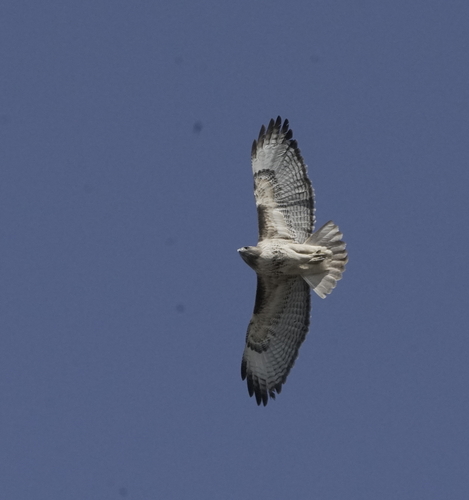 © Cat Chang, CC BY-NCRed-tailed Hawk Buteo jamaicensis
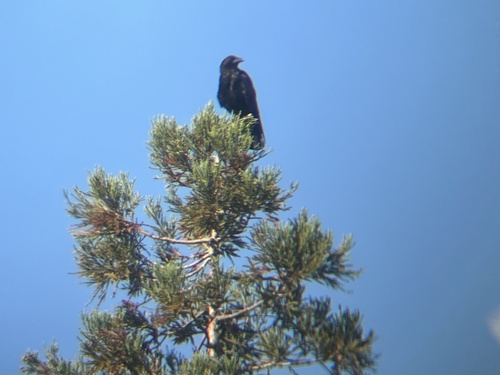 © James T. Von Tersch, CC BY-NCCommon Raven Corvus corax
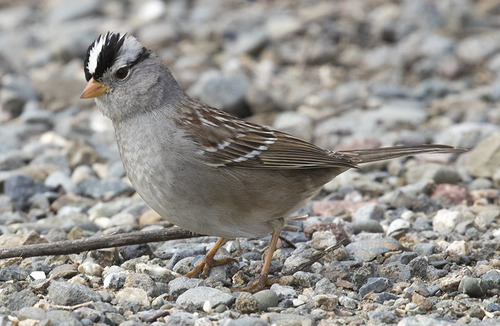 © Paul Donahue, CC BY-NCWhite-crowned Sparrow Zonotrichia leucophrys
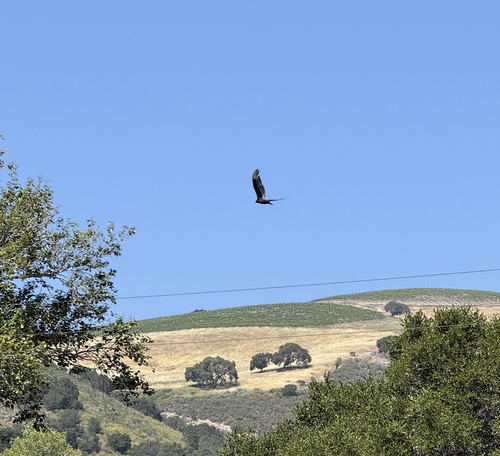 © Kat Morgan, CC BY-NCTurkey Vulture Cathartes aura
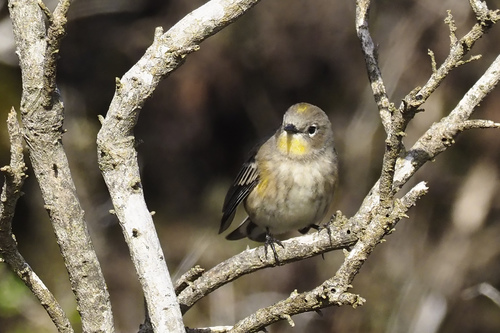 © Donna Pomeroy, CC BY-NCYellow-rumped Warbler Setophaga coronata
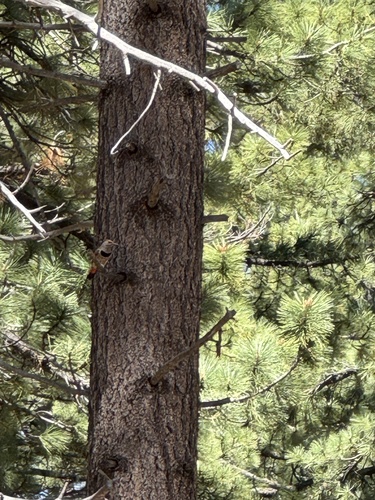 © elysewh2013, CC BY-NCNorthern Flicker Colaptes auratus
 © hannahjanee, CC BY-NCBrewer's Blackbird Euphagus cyanocephalus
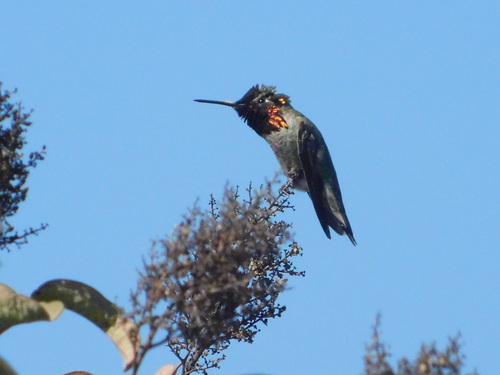 © argyl1, CC BY-NCAnna's Hummingbird Calypte anna
More birds to know
- Killdeer Charadrius vociferus
- American Coot Fulica americana
- American Robin Turdus migratorius
- Mallard Anas platyrhynchos
- American Kestrel Falco sparverius
- Dark-eyed Junco Junco hyemalis
- California Quail Callipepla californica
- Red-winged Blackbird Agelaius phoeniceus
- Eurasian Collared-Dove Streptopelia decaocto
- House Sparrow Passer domesticus
- Bald Eagle Haliaeetus leucocephalus
- Western Tanager Piranga ludoviciana
- House Finch Haemorhous mexicanus
- Western Meadowlark Sturnella neglecta
- Great Blue Heron Ardea herodias
- Song Sparrow Melospiza melodia
- Say's Phoebe Sayornis saya
- Osprey Pandion haliaetus
- Black Phoebe Sayornis nigricans
- Black-headed Grosbeak Pheucticus melanocephalus
- Great Horned Owl Bubo virginianus
- Savannah Sparrow Passerculus sandwichensis
- Spotted Towhee Pipilo maculatus
- Great Egret Ardea alba
The biggest families
- Ducks, Geese, and Waterfowl Anatidae · 62 species
- New World Warblers Parulidae · 47 species
- Sandpipers and Allies Scolopacidae · 47 species
- Gulls, Terns, and Skimmers Laridae · 37 species
- New World Sparrows Passerellidae · 32 species
- Tyrant Flycatchers Tyrannidae · 29 species
- Hawks, Eagles, and Kites Accipitridae · 21 species
- Troupials and Allies Icteridae · 19 species
Other quizzes for California
- California mammal quiz
- California reptile quiz
- California amphibian quiz
- California fish quiz
- California insect quiz
- California spider quiz
- California snail and slug quiz
Bird quizzes nearby
- United States
- Alabama
- Alaska
- Arizona
- Arkansas
- Colorado
- Connecticut
- Delaware
- Florida
- Georgia
- Hawaii
- Idaho
- Illinois
- Indiana
- Iowa
- Kansas
- Kentucky
- Louisiana
- Maine
- Maryland
- Massachusetts
- Michigan
- Minnesota
- Mississippi
- Missouri
- Montana
- Nebraska
- Nevada
- New Hampshire
- New Jersey
- New Mexico
- New York
- North Carolina
- North Dakota
- Ohio
- Oklahoma
- Oregon
- Pennsylvania
- Rhode Island
- South Carolina
- South Dakota
- Tennessee
- Texas
- Utah
- Vermont
- Virginia
- Washington
- West Virginia
- Wisconsin
- Wyoming
Photos and sightings from iNaturalist. The counts are of research-grade observations with photos.
How to play
Animal ID Quiz shows you real wildlife photos from iNaturalist and asks you to name the species. Here's everything you can do.
1. Set up a quiz
- Animal group. Tap one of the eight groups: birds, mammals, reptiles, amphibians, fish, insects, arachnids (spiders and kin) or mollusks (snails, slugs and kin).
- Place. Start typing a country, state, county, city or park, then pick it from the list (typing alone isn't enough). You'll only see species that have been seen there, and the wrong answers are species seen there too.
- Narrow it down (optional). Type a family, a genus or a word from the names, such as "warblers", "hawks" or "Turdus", and pick from the list. You can add up to five; tap one to remove it. Leave it empty to be asked about the whole group.
- Questions. Choose 5, 10 or 20, then tap Start quiz. The difficulty shown above the button is set in Settings.
Your last group, place and number of questions are remembered on this device, so the next quiz starts where you left off.
2. Look closely at the photo
- Zoom. Pinch, or double-tap where you want to look, on a phone or tablet. On a computer, double-click, scroll the mouse wheel, or use the + and − buttons. Zooming in loads a sharper version of the photo.
- Move around. Drag the photo while zoomed in. The fit button (four corners) shows the whole photo again.
- Brightness, contrast and saturation. The half-filled circle button opens sliders that help with dark or washed-out photos. Your settings stay for the next photos; Reset puts them back.
- More photos. Many observations have more than one photo. When they do, arrows appear on the sides of the photo with a count such as "1 / 3" in the corner. Tap the arrows or swipe left and right to see the others; they often show a different angle or another field mark.
- Where it was seen. The line below the photo says where the observation was made, such as a park, county, state and country. The photographer and license are credited in the corner of the photo.
- Missing photos. Now and then a photo has been removed from iNaturalist. The quiz then shows the observation's next photo instead, or tells you the photo is no longer available.
3. Answer
- Tap the species you think it is. Each choice shows the English name (when there is one) with the scientific name below it.
- The right answer turns green. If you picked something else, your answer turns red, and the line below tells you what it was.
- Species accounts. After you answer, tap any choice's English name to open that species' account: photos, range maps, similar species and more. Birds open on iNaturalist or eBird, whichever you picked under Bird species pages in Settings; other animals always open iNaturalist. See this observation on iNaturalist opens the original record with all its photos.
- What does the scientific name mean? When it's turned on, a What does Genus species mean? link appears after you answer. Tap it to see where each part of the scientific name comes from (its Latin or Greek roots), what it means word for word and in plain English, and how to say it. The answer comes from scientificwords.com and opens in a card over the quiz. A name nobody has asked about before can take several seconds; a spinner shows while it's working, and Cancel stops it. Tap × or press Esc to close the card.
- Tap Next for the next photo. After the last one you'll see your score.
Keyboard shortcuts (computers)
- A B C D (or 1–4) pick an answer.
- ← and → show the observation's other photos.
- Enter goes to the next question.
- + and − zoom in and out, and 0 fits the photo.
4. Your score
- The results page lists every photo with the right answer and what you said. Tap a name to open that species' page (iNaturalist, or eBird for birds if you chose it), or tap the small photo to open the observation on iNaturalist.
- Play again starts a new quiz with the same settings and new photos. Change group or place takes you back to set-up.
- A quiz is saved as you go: if you close the page or lose your connection, open the same link again to pick up where you were.
Settings
Tap the gear icon at the top right to open Settings. Changes save as soon as you make them.
- Difficulty. Slide left for the species most often seen in the place, right for the least often seen ones, such as rarities and occasional visitors. The middle mixes them all.
- Living animals only. On by default. It skips photos marked as dead animals, and photos that only show signs such as tracks, nests or feathers.
- Bird species pages. Choose whether a bird's name opens its page on iNaturalist or on eBird. Other animals always open iNaturalist.
If you're signed in, your settings are saved with your account and follow you to any device. Otherwise they're remembered in this browser.
Explore
Explore (at the bottom of every page) shows what the quiz holds. A map shows how many species we have in each place: point at a continent to see its count, and click it to zoom in to its countries, then states and provinces, then counties. Use the trail above the map, or your browser's back button, to go back up. Below the map are the numbers by animal group.
Accounts (optional)
- You can play without an account. Sign in to keep your scores and see them under My scores: quizzes played, average score and every past quiz.
- Create an account with your email and a password (at least 8 characters, with a lowercase letter and a number), then enter the code we email you.
- Remember me keeps you signed in on this device. Leave it off on a shared computer. Show displays the password as you type it.
- Forgot your password? Choose Forgot your password? on the sign-in page and we'll email you a code to set a new one.
- When you're signed in, your settings are kept with your account too.
- Sign out is in the top bar.
Tips
- Start with a small place and a familiar group, then widen out.
- Use Narrow it down to practise a tricky family, such as gulls or sparrows.
- Look for field marks: bill shape, wing bars, patterns, and the habitat in the background.
A photo that looks misidentified? After you answer, tap See this observation on iNaturalist and add your identification there; the iNaturalist community reviews it, and corrections reach the quiz the next time we update its data.
Something not working, or an idea to make the quiz better? Contact us. To learn where the photos come from, see About.
Privacy and cookies
Animal ID Quiz keeps the minimum it needs to run and to understand how it's used.
Cookies and browser storage
idquiz_visitor: a random ID that tells us you're the same visitor when you come back, so we can count unique visitors and limit contact messages. It lasts one year.- Quiz settings (stored in your browser, not sent anywhere): the animal group, place and question count you picked last, so the next quiz starts there.
- Sign-in (only if you sign in): your sign-in tokens, kept in your browser. With "Remember me" they last until you sign out (at most 30 days) and your email is filled in next time; without it, until you close the browser.
There are no advertising or third-party tracking cookies.
What we record
For each visit we store the day, your visitor ID, your IP address and the site that linked here. For each quiz we store the group, place and filters you chose, the answers you gave and your visitor ID. We use this to count visitors and quizzes and to improve the quiz.
Accounts
If you create an account, your email address and password are handled by Amazon Cognito; we never see your password. Your quizzes are linked to your account so you can see your scores. Signing in is optional.
Photos
Photos are loaded straight from iNaturalist's photo servers, which see your IP address like any website you visit. Each photo is credited to its observer under its Creative Commons license.
Contact form
If you write to us through the contact form, we keep your name, email address, message, visitor ID and IP address, and email the message to the site's editors. Your email address is used only to reply to you. You can send up to 3 messages a day.
Feature flags
Back to adminTurn features on or off for everyone using the app. Changes reach players when they start their next quiz or come back to the tab.
Admin
Feature flagsQuizzes per day, by animal group
Unique visitors per day
Show daily numbers as a table
Quizzes by animal group
Most quizzed places
Most used “Narrow it down”
Where visitors come from
Visits (one per visitor per day) by the site that linked here. "(direct)" means typed in,
a bookmark, or an app that hides where it came from. Links you post with ?ref=reddit show as "tag: reddit".
Visitors
A visitor is one browser (a cookie); the IP addresses it used are shown alongside. Most quizzes first.